Boot 9front on RPi over Wi-Fi
Posted on Mon 06 October 2025 in OS
Boot via USB (Kernel)
Now that I can power my nodes, it's time they actually boot.
As in the official linux clusterhat software, I would like to use the Pi Zero's usbboot mode.
With this tool, I can provide the stuff you usually find in the FAT partition of your Pi's SD cards via USB:
The firmware files, config.txt, cmdline.txt, and ultimately, the kernel, in this case 9pi3.
To get started, let's use the known-working software on a Linux machine first. I simply copied the contents of my 9front SD card into a folder, connected a Pi0 via USB, ran
sudo ./rpiboot 9front/
and voila: a plan9 bootprompt!
bootargs is (tcp, tls, il, local!device)[]
Boot via Wi-Fi (Filesystem)
Now, what shall we boot then? Plan9 was designed from the get-go for distributed systems. There's separate servers for authentication, the filesystem, and the pure CPU time. That maps quite nicely to my setup: the base RPi4 can be the auth/fs server ("head node"), with the Zeroes being pure, diskless CPU servers. I only need to manage one installation and learn more about the intended design of Plan9 - win win!
So, let's try to use tcp boot instead by modifying our cmdline.txt:
console=0 user=glenda authdom=home.net \
nobootprompt=tcp fs=192.168.1.3 auth=192.168.1.3 \
essid='CoolWifiName' wpapsk=abs0lut3s3cur3t0k3n wpaopts=-2
(all a single line, really, but that's not rendered nicely on this page...)
I've got fs and auth running on the head node, so I specify its IP address.
nobootprompt tells the kernel to go ahead and establish the connection (using given user and authdom) without waiting for input, ideal for a headless node.
For a network boot, we obviously need a connection, and the Pi Zero only has Wi-Fi (if at all).
We can setup wifi on boot via the remaining essid and wpapsk arguments - note also wpaopts=-2 to enable a bit of security by using WPA-2.
This should have wifi ready once the boot prompt is reached - unless it doesn't.
We first need to provide the firmware blobs, which can be obtained here.
For my Pi4 + Pi02W setup, I've copied the brcmfmac43436-sdio.* and brcmfmac43455-sdio.* files into /lib/firmware on the head node.
That's enough to enable wifi at runtime, but for early login during the boot procedure, the kernel has to be rebuilt:
cd /sys/src/9/bcm64
mk
This embeds the firmware in the kernel image. The node still does not boot, however. Time for some debugging...
Creating a useful dev workflow when nothing really works yet
I still don't know how to debug the kernel beyond some good old printf debugging (or echo, in this case),
so a few lengthy debug rounds are to be expected.
After some initial struggle, I came up with this setup:
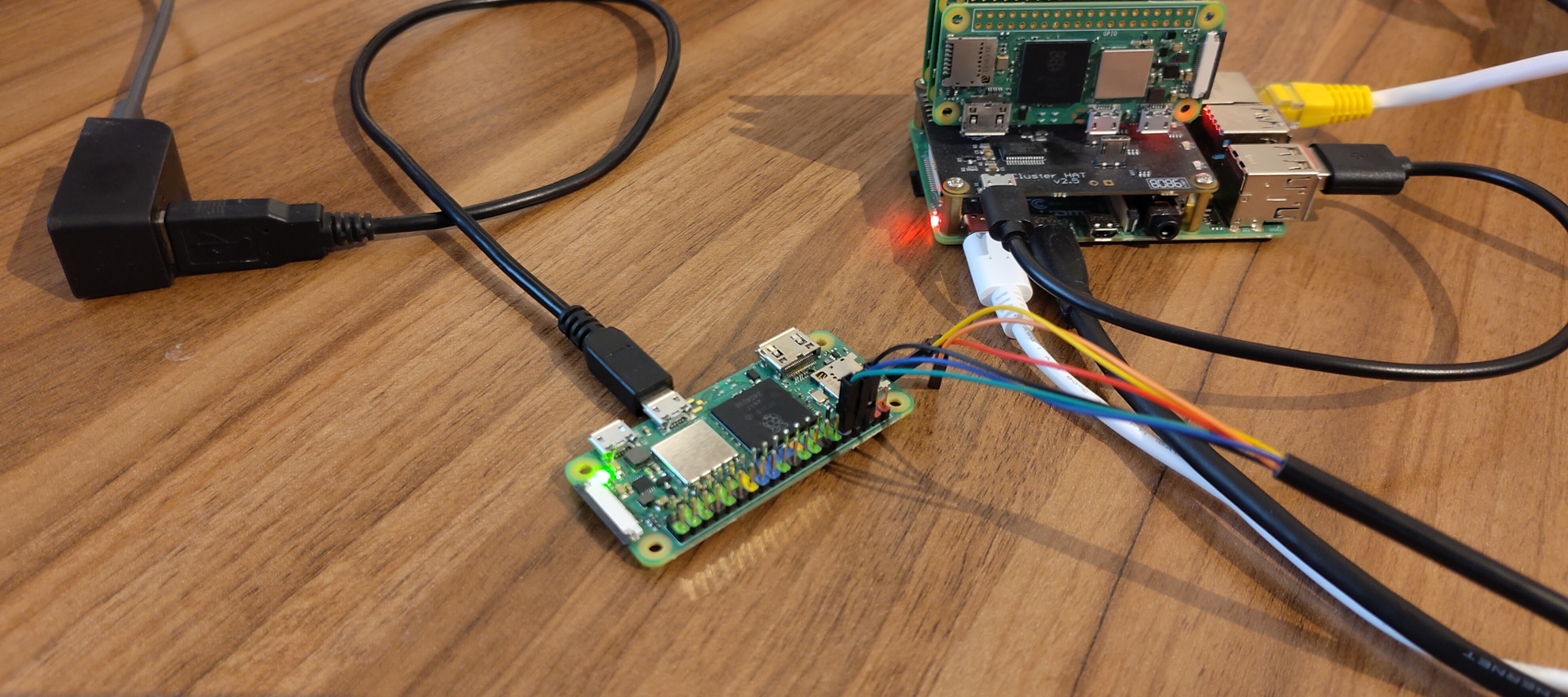 Since I'm still using the Linux based
 usbboot, I'm working mainly on my desktop.
The desktop has two physical connections to the Zero:
- via USB for the
usbbootprocedure - via a UART dongle to get the serial console output (
minicom -D /dev/ttyUSB0)
Then there's two logical connections to the head node:
- a drawterm connection onto the head, so I can recompile the kernel image
- a 9pfs connection onto the desktop, for editing the sources and copying the kernel image into the
usbbootroot
Tracking the serial output, we first see that the Zero does at least something with the wifi device:
ether4330: chip 43430 rev 2 type 1
ether4330: firmware ready
ether4330: addr 2ccf67ca45b4
ether4330: cmd 263 error status -23
ether4330: cmd error:
25 00 da ff 1c 00 00 0c 00 2b 00 00 07 01 00 00
00 00 00 00 01 00 1b 00 e9 ff ff ff 6e 64 6f 65
00 01 00 00 00
This looks a bit scary, but this error doesn't seem to do much harm (so far). I'm more worried about this:
error: ip/ipconfig: /net/ipifc/clone: bind ether /net/ether0: file does not exist: '/net'
srv: dial tcp!192.168.178.36!564: no route
Since the failed tcp boot puts me back to the regular boot prompt, I can enter a boot shell with !rc.
Indeed, the /net namespace is not configured correctly.
However, I can access the '#l0' device without any issues, and setting up wifi manually works flawlessly:
bind -a '#l0' /net
echo 'key proto=wpapsk essid=''CoolWifiName'' !password=abs0lut3s3cur3t0k3n' >>/mnt/factotum/ctl
aux/wpa -2 -s 'CoolWifiName' -p /net/ether0
ip/ipconfig ether /net/ether0
What's going on then?
Most boot code can be found in /sys/src/9/boot.
While there's some C code there, most is rc scripts, so it should be relatively easy to see what's going on.
I started adding some stray echos to the scripts and then did a recompile, copy kernel, reboot debug loop.
I first tried inspecting the wifi setup code in /sys/src/9/boot/net.rc, only to notice it's not even called.
bootrc contains mostly generic code - and a very small loop that should set up the /net directory:
# bind in an ip interface
for(i in I l^(0 1 2 3))
    bind -qa '#'$i /net
bind -qa '#a' /net
Looks harmless enough to discard it on the first few skims through the code, but isn't the issue actually that the #l0 device is not bound to /net?
I've added a few more echos to variables there and unrolled the loop, to not much avail.
Since I could ls the device from the interactive shell, does this work here as well?
Looking up a bit more of rc's syntax, I've changed the code to this:
bind -qa '#I' /net
bind -qa '#l0' /net
echo `{ls '#l0'}
echo `{ls /net}
I could access the device, but it's still not bound. What if we change the order?
bind -qa '#I' /net
echo `{ls '#l0'}
bind -qa '#l0' /net
echo `{ls /net}
And wouldn't you know, it works!
/net/arp
/net/bootp
/net/cs
/net/dns
/net/ether0 <----!
/net/icmp
/net/icmpv6
/net/ipifc
/net/ipmux
/net/iproute
/net/ipselftab
/net/log
/net/ndb
/net/tcp
/net/udp
What the hell does this mean?
Having any access to #l0 before trying to bind it solves the issue!
I guess I just keep a ls '#l0' with no side effects in bootrc.
Probably it's something to do with the external firmware, like loading times, or the reported cmd errors...
Nevertheless, one step closer to the goal:
I can now USB-early-boot from Linux + TCP-late-boot over Wi-Fi!
There's a few config quirks to figure out for production use,
like how to properly configure auth and encryption (tls instead of tcp),
or how to provide node-specific configuration (lib/ndb/local + mac address? or on-the-fly cmdline.txt generation?).
But the big next steps will be getting the usb-boot running on 9front itself (USB-Host)
and ultimately to have USB-networking (USB-otg/client software...) to connect the nodes to the head node.
At least, I now have a rather quick kernel debug workflow.
See you in the next chapter!